
Mechanical Drawing, Electrical Graphical Symbols, Control Device Numbers, and Sequence Diagrams (JIS / JEM Standards)
機械製図・電気用図記号・制御器具番号とシーケンス接続図(JIS・JEM規格)
Electrical Equipment Assembly – Control Panels 電気機器組立て (Grade 2 theory) · 技能検定「電気機器組立て」2級 学科(配電盤・制御盤組立て) · Written by Tokutei Pass based on the official study texts; not copied verbatim.
機械製図の第三角法・線の種類と寸法記入法(JIS B 0001)
Third-Angle Projection, Line Types, and Dimensioning Rules in Mechanical Drawing (JIS B 0001)
日本産業規格(JIS B 0001)の機械製図では、原則として「第三角法」を用います。第三角法では主な面を示す「正面図」を基準として、その上側に「平面図(上から見た図)」、右側に「右側面図」、左側に「左側面図」、下側に「下面図」を配置します。
In mechanical drawings under the Japanese Industrial Standards (JIS B 0001), "third-angle projection" is used in principle. Taking the "front view" showing the main face as the reference, the "top view (plan view)" is placed above it, the "right side view" to its right, the "left side view" to its left, and the "bottom view" below it.
製図に用いる線の種類は、目に見える外形を示す「外形線=太い実線」、見えない部分の形を示す「かくれ線=破線」、円や対称図形の中心を示す「中心線=細い一点鎖線」、可動部の移動位置等を示す「想像線=細い二点鎖線」、寸法線や引出線の「細い実線」と定められています。
Line types used in drawings are defined as: "visible outline = thick solid line" for visible outer shapes, "hidden line = dashed line" for invisible parts, "center line = thin chain line" for centers of circles and symmetrical shapes, "phantom (imaginary) line = thin double-dot chain line" for moving positions of movable parts, and "thin solid line" for dimension and leader lines.
寸法数値の前に付ける記号は、直径が「φ(まる)」、半径が「R」、正方形の一辺が「□(かく)」、球の直径・半径が「Sφ・SR」、板厚が「t」、45°の面取りが「C(例:C2は2mm×45°)」です。
Symbols placed before dimension numerals are: "φ (maru)" for diameter, "R" for radius, "□ (kaku)" for one side of a square, "Sφ, SR" for spherical diameter and radius, "t" for plate thickness, and "C" for a 45° chamfer (e.g., C2 means 2mm × 45°).
JISの寸法記入法において、「角度の寸法線」は角度を構成する2辺の交点(頂点)を中心とする「円弧」で描き、また扇形の円弧の中心角が大きい場合の寸法補助線は中心に向かう放射線状に引きます(直線で角度を示したり平行線で引き出すのは誤りです)。
Under JIS dimensioning rules, an "angle dimension line" is drawn as a "circular arc" centered at the intersection (vertex) of the two sides forming the angle, and when the central angle of a sector arc is large, extension lines are drawn radially toward the center (indicating an angle with a straight line or drawing parallel extension lines is incorrect).
また円弧の半径 R を示す寸法線には、円弧側にのみ矢印をつけ、中心側には矢印をつけません。同じ寸法の穴が複数ある場合は「4−φ9(直径9mmの穴が4個)」のように個数を前に記します。
Also, on a dimension line indicating the radius R of an arc, an arrowhead is placed only on the arc side, with no arrowhead on the center side. When there are multiple holes of the same size, the quantity is written in front, such as "4−φ9 (four holes of 9mm diameter)".
Key points
- 第三角法では正面図の上に平面図、右に右側面図を配置し、外形線は太い実線、かくれ線は破線、中心線は細い一点鎖線で描く
In third-angle projection, the top view is placed above and the right side view to the right of the front view; visible outlines use thick solid lines, hidden lines use dashed lines, and center lines use thin chain lines - 寸法補助記号は直径が「φ」、半径が「R」、正方形の辺が「□」、板厚が「t」、45°面取りが「C」である
Dimension prefix symbols are "φ" for diameter, "R" for radius, "□" for a square side, "t" for plate thickness, and "C" for a 45° chamfer - 角度の寸法線は頂点を中心とする円弧で描き、半径 R の寸法線は円弧側にのみ矢印をつける
Angle dimension lines are drawn as circular arcs centered at the vertex, and radius R dimension lines have an arrowhead only on the arc side
| Word | Meaning |
|---|---|
| 第三角法(正面図・平面図・右側面図) | Third-angle projection (front view, top view, right side view) |
| 外形線(太い実線)・かくれ線(破線)・中心線(一点鎖線) | Visible outline (thick solid line), hidden line (dashed line), center line (chain line) |
| 寸法補助記号(φ・R・□・t・C) | Dimension auxiliary symbols (φ, R, □, t, C) |
| 角度・円弧・半径のJIS寸法記入法 | JIS dimensioning rules for angles, arcs, and radii |
はめあい方式(すきまばめ・中間ばめ・しまりばめ)と形状・位置公差・表面性状
Fits (Clearance, Transition, and Interference Fits), Shape/Position Tolerances, and Surface Texture
軸と穴を組み合わせる際の締まり具合(ゆるみ具合)の関係を「はめあい」といい、JISでは穴と軸の寸法公差域の位置関係により「すきまばめ」「しまりばめ」「中間ばめ」の3種類に分類しています。
The relationship of tightness (or looseness) when mating a shaft and a hole is called a "fit (hameai)", which JIS classifies into three types according to the positional relationship of the hole and shaft tolerance zones: "clearance fit", "interference fit", and "transition fit".
「すきまばめ」は穴の最小許容寸法が軸の最大許容寸法より大きく、組み立てたとき常に「すきま」ができるはめあいです。反対に「しまりばめ」は軸の方が穴より常に大きく、組み立てたとき常に「しめしろ」ができるはめあいです。
A "clearance fit" has the minimum permissible diameter of the hole larger than the maximum permissible diameter of the shaft, always leaving a "clearance" when assembled. Conversely, an "interference fit" always has the shaft larger than the hole, always creating an "interference" when assembled.
「中間ばめ」は穴と軸の公差域が重なり合っており、仕上がった穴と軸の実寸法によって「すきまができる場合と、しめしろができる場合の両方があるはめあい」です。また一般には穴の公差域(H7など)を基準にして軸の寸法を変える「穴基準はめあい」が多く用いられます。
In a "transition fit", the tolerance zones of the hole and shaft overlap, meaning "depending on the actual finished dimensions of the hole and shaft, either a clearance or an interference may result". Generally, the "hole-basis system of fits"—which fixes the hole tolerance zone (such as H7) as the reference and varies the shaft dimension—is widely used.
部品の形状や姿勢・位置の精度を指定する「形状・位置公差(JIS B 0021)」には、平面の平らさを示す「平面度」、基準(データム)に対する「平行度・直角度・同軸度・位置度」などがあります。
"Shape and position tolerances (geometric tolerances: JIS B 0021)" specifying accuracy of part shape, orientation, and location include "flatness" indicating surface flatness, as well as "parallelism, perpendicularity, coaxiality, and position" relative to a reference (datum).
加工表面の滑らかさを示す「表面性状(表面粗さ:JIS B 0601)」には、算術平均粗さ「Ra(単位:μm)」や最大高さ粗さ「Rz」が用いられ、数値が小さいほど平滑な仕上げ面であることを示します。
"Surface texture (surface roughness: JIS B 0601)" indicating the smoothness of a machined surface uses arithmetic mean roughness "Ra (unit: μm)" and maximum height roughness "Rz", where smaller values indicate a smoother finished surface.
Key points
- はめあいには、常にすきまができる「すきまばめ」、常にしめしろができる「しまりばめ」、実寸法によりすきままたはしめしろができる「中間ばめ」がある
Fits include "clearance fit" (always has clearance), "interference fit" (always has interference), and "transition fit" (has either clearance or interference depending on actual dimensions) - 機械加工では、穴の公差域(H)を一定にして軸の公差域を変える「穴基準はめあい」が広く使われる
In machining, the "hole-basis fit system" that keeps the hole tolerance zone (H) constant and varies the shaft tolerance zone is widely used - 表面粗さには「算術平均粗さ(Ra)」や「最大高さ粗さ(Rz)」が用いられる
"Arithmetic mean roughness (Ra)" and "maximum height roughness (Rz)" are used for surface roughness
| Word | Meaning |
|---|---|
| すきまばめ・中間ばめ・しまりばめ | Clearance fit, transition fit, and interference fit |
| 穴基準はめあいと寸法公差 | Hole-basis fit system and dimensional tolerance |
| 形状・位置公差(平面度・平行度・直角度)とデータム | Shape/position tolerances (flatness, parallelism, perpendicularity) and datum |
| 表面性状(算術平均粗さ Ra・最大高さ粗さ Rz) | Surface texture (arithmetic mean roughness Ra, maximum height roughness Rz) |
配電盤・制御盤の接続図(単線接続図・展開接続図・裏面接続図)
Switchboard and Control Panel Connection Diagrams (Single-Line, Elementary/Sequence, and Rear Connection Diagrams)
配電盤や制御盤の設計・製作・保守に用いられる図面には、盤の外観寸法や器具配置を示す「外形図(構造図)」のほか、電気的な接続関係を表す「単線接続図」「展開接続図」「裏面接続図(内部接続図)」があります。
Drawings used in designing, manufacturing, and maintaining switchboards and control panels include "outline drawings (structural drawings)" showing external dimensions and equipment layout, as well as "single-line connection diagrams", "elementary connection diagrams (sequence diagrams)", and "rear connection diagrams (internal connection diagrams)" representing electrical connections.
「単線接続図(スケルトン図)」は、三相3線式などの多相回路であっても「1本の線(単線)」で代表させ、電気用図記号と制御器具番号・文字記号を用いて、主回路機器や計器・保護継電器の全体構成と接続関係を一目で分かるように描いた図面です。
A "single-line connection diagram (skeleton diagram)" represents even multi-phase circuits such as three-phase 3-wire circuits with a "single line", using electrical graphical symbols, control device numbers, and letter symbols so the overall configuration and connection relationships of main circuit equipment, meters, and protective relays can be understood at a glance.
「展開接続図(シーケンス図)」は、機器の実際の取付位置や外形にはとらわれず、電磁接触器やリレーの「動作コイル」と「各接点」を機能別に分離して配置し、電流の流れや制御動作の順序(シーケンス)が最も理解しやすいように展開して描いた図面です。
An "elementary connection diagram (sequence diagram)" disregards the actual mounting positions or outer shapes of equipment, separating the "operating coils" and "individual contacts" of magnetic contactors and relays by function and laying them out so the flow of current and order of control operations (sequence) are easiest to understand.
展開接続図では、原則として上または左の母線から下または右へ向かって動作順に回路を並べ、すべての接点は「電源が切れて外力が加わっていない無励磁(復帰)状態」で作図します。
In an elementary connection diagram, circuits are arranged in order of operation from top or left busbars toward the bottom or right in principle, and all contacts are drawn in the "de-energized (normal/returned) state with power off and no external force applied".
「裏面接続図(内部接続図・実体配線図)」は、配電盤・制御盤を「裏面(配線作業面)」から見た実際の機器配置や端子台の位置通りに描き、どの端子とどの端子をどの電線でつなぐかを直接示した製造・配線作業用の図面です。
A "rear connection diagram (internal connection diagram / practical wiring diagram)" is drawn according to the actual equipment layout and terminal block positions as viewed from the "rear side (wiring work side)" of the switchboard or control panel, directly showing which terminals are connected by which wires for manufacturing and wiring work.
Key points
- 「単線接続図」は、図記号と制御器具番号等を用いて、多相回路を含む主回路全体の機器構成や接続関係を単線で表した図である
A "single-line connection diagram" uses graphical symbols and control device numbers to represent the overall equipment configuration and connections of multi-phase main circuits with a single line - 「展開接続図(シーケンス図)」は、機器の実配置に関係なく、制御動作の順序や機能が理解しやすいようにコイルと接点を分けて描いた図である
An "elementary connection diagram (sequence diagram)" separates coils and contacts by function regardless of physical layout so the sequence of control operations is easy to understand - 「裏面接続図」は、盤の裏面から見た実際の器具位置・端子配列通りに電線の接続を示した配線作業用の図である
A "rear connection diagram" shows wire connections according to actual device positions and terminal arrangements as seen from the rear of the panel for wiring work
| Word | Meaning |
|---|---|
| 単線接続図(スケルトン図・全体構成図) | Single-line connection diagram (skeleton diagram / overall configuration diagram) |
| 展開接続図(シーケンス図・機能別配置) | Elementary connection diagram (sequence diagram / functional layout) |
| 裏面接続図(内部接続図・配線作業用) | Rear connection diagram (internal connection diagram / for wiring work) |
| 外形図(構造図)と器具配置図 | Outline drawing (structural drawing) and equipment layout drawing |
電気用図記号(JIS C 0617)のa接点・b接点・操作スイッチ・タイマ限時接点
Electrical Graphical Symbols (JIS C 0617): a-Contacts, b-Contacts, Operating Switches, and Timer Contacts
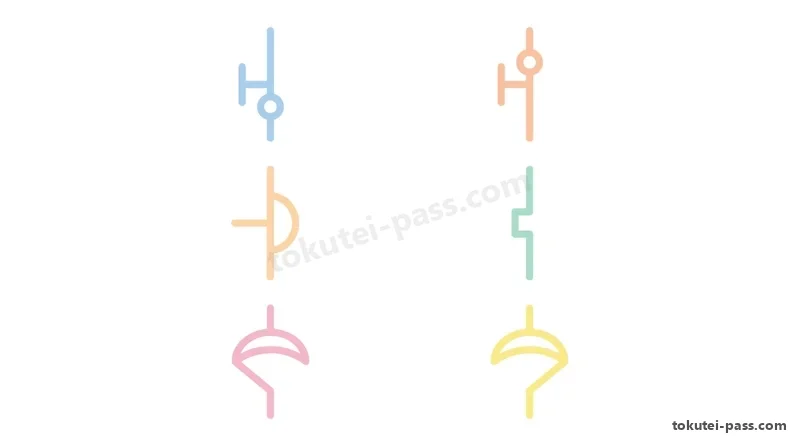
JIS C 0617(電気用図記号)において、操作していない平常状態(無励磁状態)で開いており、操作(動作)すると閉じて導通する接点を「メーク接点(a接点:常開接点 NO)」といいます。縦描き図面では固定接点の「右側」、横描き図面では「上側」に可動片を描きます。
In JIS C 0617 (Graphical Symbols for Electrical Engineering), a contact that is open in the normal unoperated (de-energized) state and closes to conduct when operated is called a "make contact (a-contact: normally open NO)". The movable contact bar is drawn on the "right side" of the fixed contact in vertical drawings, and on the "upper side" in horizontal drawings.
反対に、操作していない平常状態で閉じており、操作(動作)すると開いて回路を切る接点を「ブレーク接点(b接点:常閉接点 NC)」といいます。縦描きでは「左側」、横描きでは「下側」に可動片を描きます。また共通端子を持つ切換接点を「c接点(トランスファ接点)」といいます。
Conversely, a contact that is closed in the normal unoperated state and opens to break the circuit when operated is called a "break contact (b-contact: normally closed NC)". The movable bar is drawn on the "left side" in vertical drawings and on the "lower side" in horizontal drawings. A changeover contact with a common terminal is called a "c-contact (transfer contact)".
接点の操作方法を示す図記号では、可動接点片の動く向きと同じ側に操作記号を描きます。操作部の先端が「T字形(横棒)」のものは一般の「手動操作スイッチ(手動自動復帰接点)」、コの字形のキャップが付いたものは「押しボタンスイッチ」、引っ張る矢印形は「プルスイッチ」を表します。
In graphical symbols indicating the operating method of a contact, the operating symbol is drawn on the same side as the direction of movable contact movement. A "T-shaped (crossbar)" tip represents a general "manual operating switch", a "U-shaped (bracket-shaped) cap" represents a "pushbutton switch", and a pulling arrow represents a "pull switch".
また機械的な当たり(カムやドッグ)で作動する「リミットスイッチ(位置検出スイッチ)」は接点片に三角形のマークを付け、温度で作動する「温度スイッチ(サーマルスイッチ)」は四角形や温度記号を付けて区別します。
Furthermore, a "limit switch (position switch)" actuated by mechanical contact (cam or dog) has a triangle mark attached to the contact bar, while a "temperature switch (thermal switch)" actuated by temperature is distinguished by a rectangle or temperature symbol.
タイマ(限時継電器)の「限時接点」では、コイルに電源が入ってから設定時間後に遅れて動作し、電源が切れると瞬時に戻る「オンディレー(限時動作・瞬時復帰)接点」に、動作方向(接点が動く向き)へ膨らむ半円弧(パラシュート形の傘マーク)を描きます。
For "time-delay contacts" of a timer (time-delay relay), an "on-delay (time-delayed operation, instantaneous return) contact"—which operates after a preset delay once the coil is energized and returns instantaneously when de-energized—is drawn with a semicircle (parachute canopy mark) bulging in the direction of operation (direction the contact moves).
Key points
- 動作したときに閉じる接点を「メーク接点(a接点)」、動作したときに開く接点を「ブレーク接点(b接点)」という
A contact that closes when operated is called a "make contact (a-contact)", and a contact that opens when operated is called a "break contact (b-contact)" - JIS図記号で、操作線の先端がT字形のものは一般の「手動操作スイッチ」、コの字形のものは「押しボタンスイッチ」を示す
In JIS graphical symbols, an operating line with a T-shaped tip indicates a general "manual switch", and one with a bracket/cup tip indicates a "pushbutton switch" - タイマのオンディレー(限時動作・瞬時復帰)接点は、接点が動作する向きへ開いた半円弧記号を付けて表す
An on-delay (time-delayed operation, instantaneous return) timer contact is represented with a semicircular symbol opening toward the direction of contact operation
| Word | Meaning |
|---|---|
| メーク接点(a接点)とブレーク接点(b接点) | Make contact (a-contact) and break contact (b-contact) |
| 手動操作スイッチと押しボタンスイッチの図記号 | Graphical symbols for manual operating switches and pushbutton switches |
| リミットスイッチと温度スイッチの図記号 | Graphical symbols for limit switches and temperature switches |
| オンディレー限時接点とオフディレー限時接点 | On-delay time contacts and off-delay time contacts |
JEM制御器具番号(27・49・51・52・59・72・88)と文字記号(RSC・X・Y・W)
JEM Control Device Numbers (27, 49, 51, 52, 59, 72, 88) and Letter Symbols (RSC, X, Y, W)
日本電機工業会規格(JEM 1090)では、配電盤・制御盤の各機器に機能別の「基本器具番号(制御器具番号)」を定めています。電圧系では「27=交流不足電圧継電器(UVR)」「59=交流過電圧継電器(OVR)」「64=地絡過電圧継電器(OVGR)」です。
The Japan Electrical Manufacturers' Association standard (JEM 1090) defines functional "basic device numbers (control device numbers)" for equipment in switchboards and control panels. Voltage-related numbers include: "27 = AC undervoltage relay (UVR)", "59 = AC overvoltage relay (OVR)", and "64 = ground overvoltage relay (OVGR)".
電流・熱・同期系では、「49=交流熱動継電器(サーマルリレー THR)」「51=交流過電流継電器(OCR)」「67=交流方向過電流継電器(地絡方向継電器 DGR)」「25=同期検出装置または同期投入装置」「30=表示継電器(故障表示器)」と定められています。
Current, thermal, and synchronizing numbers are defined as: "49 = AC thermal relay (THR)", "51 = AC overcurrent relay (OCR)", "67 = AC directional overcurrent relay (directional ground relay DGR)", "25 = synchronizing check or synchronizing closing device", and "30 = annunciator relay (fault indicator)".
開閉器・遮断器系では、「52=交流遮断器(CB)」「72=直流遮断器(DCCB)」「42=運転用遮断器または接触器」「43=手動制御切替スイッチ」「88=補助電動機または電動機用電磁接触器」「89=開閉器(断路器 DS)」です(72を直流過電流継電器とする記述は誤りです)。
Switch and circuit breaker numbers include: "52 = AC circuit breaker (CB)", "72 = DC circuit breaker (DCCB)", "42 = running circuit breaker or contactor", "43 = manual control transfer switch", "88 = auxiliary motor or motor magnetic contactor", and "89 = line switch (disconnector DS)" (describing 72 as a DC overcurrent relay is incorrect).
また制御方式を表すJEM文字記号は、「AMC=自動制御」「SQC=シーケンス制御」「PMC=プログラム制御」「RSC=遠方監視制御」と定められています(RSCを追従制御とするのは試験で頻出する誤りです)。
Furthermore, JEM letter symbols representing control methods are defined as: "AMC = automatic control", "SQC = sequence control", "PMC = program control", and "RSC = remote supervisory control" (defining RSC as follow-up control is a frequent exam trap).
さらに遮断器などの付属器具を表すJEM文字記号では、「CC=投入コイル」「TC=引外しコイル」「X=投入用補助継電器」「Y=ポンピング防止継電器(再投入防止)」「W=補助開閉器(補助スイッチ)」です(Wを引外し自由継電器とする選択肢は誤りです)。
In addition, among JEM letter symbols for circuit breaker accessories: "CC = closing coil", "TC = trip coil", "X = auxiliary relay for closing", "Y = anti-pumping relay (re-closing prevention)", and "W = auxiliary switch" (options defining W as a trip-free relay are incorrect).
Key points
- JEM制御器具番号は「27=交流不足電圧継電器、49=サーマルリレー、51=交流過電流継電器、52=交流遮断器、59=交流過電圧継電器」である
JEM control device numbers are "27 = AC undervoltage relay, 49 = thermal relay, 51 = AC overcurrent relay, 52 = AC circuit breaker, 59 = AC overvoltage relay" - 器具番号「25」は同期投入(同期検出)装置、「72」は直流遮断器であり、72を直流過電流継電器とするのは誤りである
Device number "25" is a synchronizing device and "72" is a DC circuit breaker; calling 72 a DC overcurrent relay is incorrect - JEM文字記号で「RSC=遠方監視制御(追従制御ではない)」、「X=投入用補助継電器・Y=ポンピング防止継電器・W=補助スイッチ」である
In JEM letter symbols, "RSC = remote supervisory control (not follow-up control)", and "X = closing auxiliary relay, Y = anti-pumping relay, W = auxiliary switch"
| Word | Meaning |
|---|---|
| 基本器具番号(27:UVR・51:OCR・59:OVR) | Basic device numbers (27: UVR, 51: OCR, 59: OVR) |
| 器具番号 25(同期投入)・52(交流CB)・72(直流CB) | Device numbers 25 (synchronizing), 52 (AC CB), and 72 (DC CB) |
| 制御方式文字記号(AMC・SQC・PMC・RSC=遠方監視制御) | Control method letter symbols (AMC, SQC, PMC, RSC = remote supervisory control) |
| 遮断器付属記号(X:投入補助・Y:ポンピング防止・W:補助スイッチ) | Circuit breaker accessory symbols (X: closing aux, Y: anti-pumping, W: auxiliary switch) |
基本シーケンス回路(AND・OR・自己保持回路と停止優先回路)
Basic Sequence Circuits (AND, OR, Self-Holding Circuit, and Stop-Priority Circuit)
シーケンス制御の基本回路において、2つのa接点を「直列」に接続して両方を押したときだけランプやリレーが動作する回路は「AND回路(論理積)」であり、2つのa接点を「並列」に接続してどちらか一方を押せば動作する回路は「OR回路(論理和)」です。
In basic sequence control circuits, a circuit connecting two a-contacts in "series" so a lamp or relay operates only when both are pressed is an "AND circuit (logical product)", whereas connecting two a-contacts in "parallel" so pressing either one operates the load is an "OR circuit (logical sum)".
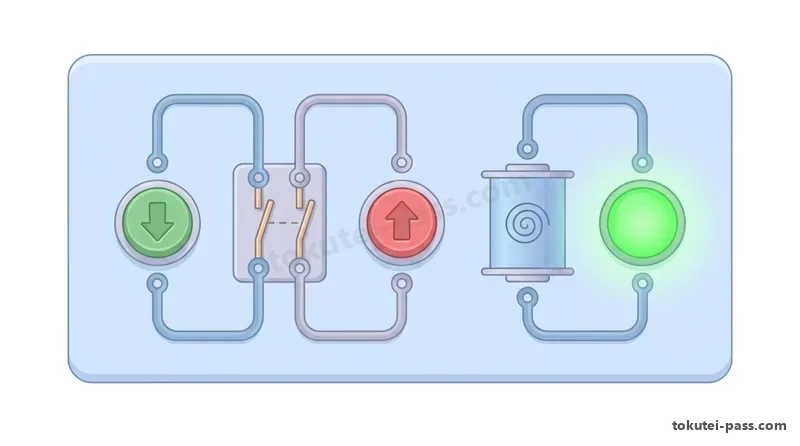
自動復帰形の始動押しボタンスイッチ BS1(a接点)は、指を離すと開いてしまいます。そこで指を離した後も電磁接触器 MC の動作状態を保ち続けるために組む回路を「自己保持回路(セルフホールド回路)」といいます。
A spring-return start pushbutton switch BS1 (a-contact) opens as soon as the finger is released. Therefore, the circuit constructed to maintain the operating state of magnetic contactor MC even after releasing the button is called a "self-holding circuit (seal-in circuit)".
自己保持回路は、始動用押しボタンスイッチ BS1(a接点)と「並列」に、その電磁接触器自身の「補助a接点(MC-a)」を接続して作ります。一度 MC のコイルが励磁されると MC-a が閉じ、BS1 から指を離しても MC-a を通って電流が流れ続けます。
A self-holding circuit is made by connecting the magnetic contactor's own "auxiliary a-contact (MC-a)" in "parallel" with the start pushbutton switch BS1 (a-contact). Once coil MC is energized, MC-a closes, allowing current to continue flowing through MC-a even after BS1 is released.
自己保持を解除して停止させるには、停止用押しボタンスイッチ BS2(b接点)および過負荷保護用サーマルリレーの接点(THR-b)を、自己保持並列部およびコイルと「直列」に接続します。
To release the self-holding state and stop operation, a stop pushbutton switch BS2 (b-contact) and the overload protection thermal relay contact (THR-b) are connected in "series" with the parallel self-holding loop and coil.
これにより、万一始動ボタン BS1 と停止ボタン BS2 が同時に押された場合や、過負荷でサーマルリレー THR が動作した場合にも、確実にコイルの電流を断って安全に停止させる「停止優先(切優先)回路」となります。
As a result, even if the start button BS1 and stop button BS2 are pressed simultaneously, or if the thermal relay THR trips due to overload, coil current is reliably interrupted to stop safely, forming a "stop-priority (off-priority) circuit".
Key points
- 自己保持回路は、始動押しボタンスイッチ(a接点)と「並列」に電磁接触器またはリレー自身の「補助a接点」を接続して構成する
A self-holding circuit is formed by connecting the magnetic contactor's or relay's own "auxiliary a-contact" in "parallel" with the start pushbutton switch (a-contact) - 停止用押しボタンスイッチ(b接点)とサーマルリレーのb接点は、自己保持回路のコイルと「直列」に接続する
The stop pushbutton switch (b-contact) and thermal relay b-contact are connected in "series" with the coil of the self-holding circuit - 停止b接点を電源側に直列配置することで、始動と停止を同時に押しても安全側に停止する「切優先(停止優先)回路」となる
Placing the stop b-contact in series on the supply side creates a "stop-priority (off-priority) circuit" that safely stops even if start and stop are pressed simultaneously
| Word | Meaning |
|---|---|
| 接点によるAND回路(直列)とOR回路(並列) | Contact AND circuit (series) and OR circuit (parallel) |
| 自己保持回路(始動a接点に補助a接点を並列接続) | Self-holding circuit (auxiliary a-contact in parallel with start a-contact) |
| 停止優先回路(切優先:停止b接点を直列接続) | Stop-priority circuit (off-priority: stop b-contact connected in series) |
| サーマルリレー(THR)のb接点による過負荷遮断 | Overload interruption via thermal relay (THR) b-contact |
インターロック回路と三相誘導電動機の正逆転主回路(可逆回路)
Interlock Circuits and Three-Phase Induction Motor Forward/Reverse Main Circuits (Reversing Circuits)
三相誘導電動機の正転・逆転運転(可逆運転)では、正転用電磁接触器 MCF と逆転用電磁接触器 MCR の2台を用います。もし MCF と MCR が同時に投入されると、主回路の電源相間が直接つながって激しい「電源短絡事故」を起こします。
For forward and reverse operation (reversing operation) of a three-phase induction motor, two magnetic contactors—forward contactor MCF and reverse contactor MCR—are used. If MCF and MCR are closed simultaneously, the main circuit supply phases are shorted directly together, causing a severe "power supply short-circuit accident".
そのため、三相の主回路(R・S・T または L1・L2・L3)において、MCF と MCR の接続は「3本のうち1本(例:中央のS相)はそのまま同じ相へつなぎ、残り2本(例:R相とT相)のみを入れ替えて接続」します。
Therefore, in the three-phase main circuit (R, S, T or L1, L2, L3), the connection between MCF and MCR is made by "connecting 1 of the 3 wires (e.g., the middle S phase) straight through to the same phase, and swapping only the remaining 2 wires (e.g., R phase and T phase)".
試験の正逆転主回路図問題では、「3本とも同じ相順のまま接続した図(逆転しない)」や「3本すべての相を順送り(R→S、S→T、T→R)に入れ替えた図(相回転順が変わらないため逆転しない)」や「相間短絡している図」が誤りの選択肢として出題されます。
In exam questions on reversing main circuit diagrams, diagrams that "connect all 3 wires in the same phase order (does not reverse)", "cyclically shift all 3 phases (R→S, S→T, T→R: phase rotation order does not change, so it does not reverse)", or "create a phase-to-phase short circuit" appear as incorrect options.
また制御回路において、一方が動作中は他方が絶対に動作できないように鎖錠する回路を「インターロック回路(同時投入防止回路)」といいます。
Furthermore, in a control circuit, a circuit that locks out one contactor so it can never operate while the other is operating is called an "interlock circuit (simultaneous-closing prevention circuit)".
電気的インターロックでは、「正転コイル MCF と直列に逆転側の補助b接点(MCR-b)を入れ、逆転コイル MCR と直列に正転側の補助b接点(MCF-b)を入れる」ことで互いに相手の投入を阻止し、さらに押しボタンインターロックや機械的インターロックを併用します。
In an electrical interlock, "the reverse auxiliary b-contact (MCR-b) is connected in series with the forward coil MCF, and the forward auxiliary b-contact (MCF-b) is connected in series with the reverse coil MCR" so each blocks the other from closing, often combined with pushbutton or mechanical interlocks.
Key points
- 三相誘導電動機の正逆転主回路では、正転用と逆転用の電磁接触器の間で「三相3本のうち2本の相のみを入れ替えて」接続する
In a three-phase induction motor reversing main circuit, "swap only 2 of the 3 phases" between the forward and reverse magnetic contactors - 3本すべてを順送り(R→S→T→R)に入れ替えても回転磁界の向きは変わらず、電動機は逆転しない
Cyclically shifting all 3 wires (R→S→T→R) does not change the rotating magnetic field direction, so the motor will not reverse - 正転・逆転の同時投入による短絡事故を防ぐため、互いのコイルに相手側の「補助b接点」を直列に入れるインターロック回路を組む
To prevent short circuits from simultaneous forward/reverse closing, build an interlock circuit inserting the opposite contactor's "auxiliary b-contact" in series with each coil
| Word | Meaning |
|---|---|
| 正逆転主回路(可逆主回路:3本中2本の入替え) | Forward/reverse main circuit (reversing main circuit: swapping 2 of 3 wires) |
| インターロック回路(同時投入防止・鎖錠回路) | Interlock circuit (simultaneous-closing prevention / lockout circuit) |
| 相手側の補助b接点による電気的インターロック | Electrical interlock using the opposite contactor's auxiliary b-contact |
| 押しボタンインターロックと機械的インターロック | Pushbutton interlock and mechanical interlock |
タイマ回路(Y-△始動シーケンス)・タイムチャートとPLCラダー図
Timer Circuits (Y-△ Starting Sequence), Time Charts, and PLC Ladder Diagrams
タイマ(限時継電器 TLR)を用いた代表的な回路である「スター・デルタ(Y-△)始動回路」では、始動ボタンを押すと主電磁接触器 MCM とスター用 MCY およびタイマ TLR が同時にONとなり、電動機はY結線で減電圧始動します。
In a "star-delta (Y-△) starting circuit", a representative circuit using a timer (time-delay relay TLR), pressing the start button simultaneously turns ON the main magnetic contactor MCM, star contactor MCY, and timer TLR, starting the motor at reduced voltage in Y connection.
タイマの設定時間が経過すると、タイマの限時b接点が開いて MCY をOFFにし、限時a接点が閉じてデルタ用 MCD をONにすることで△結線の通常運転へ切換わります。このとき MCY と MCD の間にも必ずインターロック回路を設けます。
When the timer's preset time elapses, the timer's on-delay b-contact opens to turn OFF MCY, and its on-delay a-contact closes to turn ON the delta contactor MCD, switching to normal operation in △ connection. An interlock circuit must also always be provided between MCY and MCD.
各機器や接点・表示灯のON/OFF状態を時間経過(横軸)に沿って帯状または折れ線グラフで表した図を「タイムチャート(動作時間図)」といい、複雑な時間差動作の点検や設計に用いられます。
A diagram representing the ON/OFF states of devices, contacts, and indicator lamps along elapsed time (horizontal axis) as bands or step lines is called a "time chart (operation time diagram)", used for inspecting and designing complex time-staggered operations.
またPLCのプログラム言語として最も使われる「ラダー図(階段図)」は、展開接続図によく似た記号で左右の母線間に論理を記述します。基本命令には、母線開始のa接点「LD」、b接点「LDI」、直列接続の「AND・ANI」、並列接続の「OR・ORI」、コイル出力の「OUT」があります。
Furthermore, a "ladder diagram", most widely used as a PLC programming language, describes logic between left and right vertical rails using symbols very similar to elementary sequence diagrams. Basic instructions include "LD" (a-contact at rail start), "LDI" (b-contact at rail start), "AND / ANI" (series connection), "OR / ORI" (parallel connection), and "OUT" (coil output).
PLCの入力端子(例:X1)に外部の非常停止ボタン(物理的なb接点)を接続した場合、平常時は入力 X1 が常時ONとなっているため、ラダー図内では X1 の「a接点」を直列に入れることで、ボタンを押したとき(または断線時)にOFFとなって停止するフェールセーフ回路になります。
When an external emergency stop button (physical b-contact) is wired to a PLC input terminal (e.g., X1), input X1 is normally ON; therefore, placing an "a-contact" of X1 in series inside the ladder diagram forms a fail-safe circuit that turns OFF and stops when the button is pressed (or if a wire breaks).
Key points
- Y-△始動シーケンスでは、タイマの限時接点によってスター用電磁接触器(MCY)からデルタ用(MCD)へ自動切換えし、両者間にインターロックを設ける
In a Y-△ starting sequence, timer time-delay contacts automatically switch from the star magnetic contactor (MCY) to the delta contactor (MCD), with an interlock provided between them - 機器や接点のON/OFF状態を時間軸に沿って表した図を「タイムチャート」という
A diagram showing ON/OFF states of equipment and contacts along a time axis is called a "time chart" - PLCのラダー図では、LD(a接点開始)・AND(直列)・OR(並列)・OUT(出力)などの命令でシーケンス制御を記述する
In a PLC ladder diagram, sequence control is written using instructions such as LD (start with a-contact), AND (series), OR (parallel), and OUT (output)
| Word | Meaning |
|---|---|
| スター・デルタ(Y-△)始動シーケンス回路 | Star-delta (Y-△) starting sequence circuit |
| タイムチャート(動作時間図) | Time chart (operation time diagram) |
| PLCラダー図(LD・AND・OR・OUT命令) | PLC ladder diagram (LD, AND, OR, OUT instructions) |
| 外部b接点入力とフェールセーフ設計 | External b-contact input and fail-safe design |
Drawings, Symbols & Sequence Diagrams
Practice this chapter in the appOfficial references
- 中央職業能力開発協会(JAVADA)「技能検定 電気機器組立て 2級 学科試験基準(製図・電気用図記号・器具番号)」 — https://www.javada.or.jp/jigyou/gino/giken.html
- 日本産業規格「JIS C 0617 電気用図記号」「JIS C 0445 制御器具番号」「JIS B 0001 機械製図」 — https://www.jisc.go.jp/